
Nethogs是一个终端下的网络流量监控工具,它的特别之处在于可以显示每个进程的带宽占用情况,这样可以更直观获取网络使用情况。
1 安装
根据具体环境可选择如下3种安装方式中的一种进行安装。
(1)yum安装
yum install nethogs
(2)rpm包安装
根据操作系统版本下载相应的包:
CentOS7:https://download-ib01.fedoraproject.org/pub/epel/7/x86_64/Packages/n/nethogs-0.8.5-1.el7.x86_64.rpm
CentOS8:https://download-ib01.fedoraproject.org/pub/epel/8/Everything/x86_64/Packages/n/nethogs-0.8.5-9.el8.x86_64.rpm
安装:
rpm -ivh nethogs-*.rpm
(3)源码编译安装
a.确认及安装依赖组件:
# yum install libpcap libpcap-devel gcc* ncurses*
b.下载源码包:
# wget https://github.com/raboof/nethogs/archive/refs/tags/v0.8.6.tar.gz
c.编译安装:
# tar xf v0.8.6.tar.gz
# cd nethogs-0.8.6
# make && make install
注:默认安装后的路径是/usr/local/sbin/nethogs
2 用法
# nethogs
示例输出:
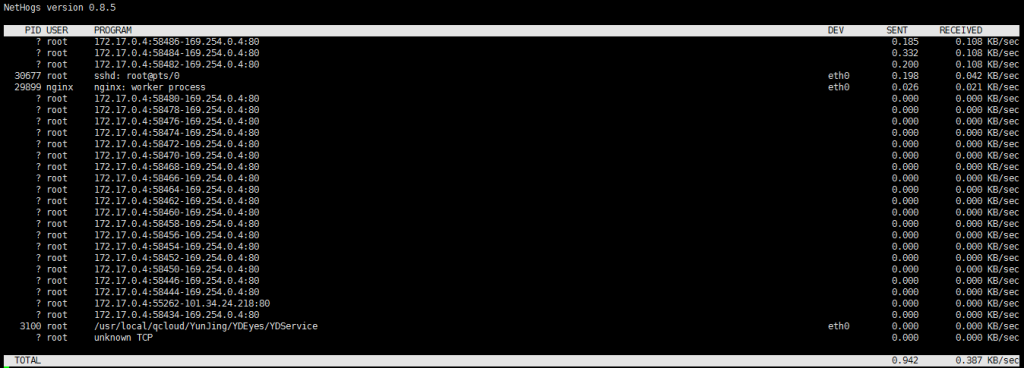
3 参数
usage: nethogs [-V] [-h] [-b] [-d seconds] [-v mode] [-c count] [-t] [-p] [-s] [device [device [device …]]]
-V : prints version.
-h : prints this help.
-b : bughunt mode – implies tracemode.
-d : delay for update refresh rate in seconds. default is 1.
-v : view mode (0 = KB/s, 1 = total KB, 2 = total B, 3 = total MB). default is 0.
-c : number of updates. default is 0 (unlimited).
-t : tracemode.
-p : sniff in promiscious mode (not recommended).
-s : sort output by sent column.
-a : monitor all devices, even loopback/stopped ones.
device : device(s) to monitor. default is all interfaces up and running excluding loopback
When nethogs is running, press:
q: quit
s: sort by SENT traffic
r: sort by RECEIVE traffic
m: switch between total (KB, B, MB) and KB/s mode
4 常用参数
实例1:设置5秒钟刷新一次,通过-d来指定刷新频率
# nethogs -d 5
实例2:监视eth0网络带宽
# nethogs eth0
实例3:同时监视eth0和eth1接口
# nethogs eth0 eth1
实例4:将nethogs监控进程的信息输出重定向到日志文件中
#nethogs -c 1 -t >nethogs.log
注:如果不加-t参数,重定向到文件中的内容可能是乱码。